Which Tool Can Import a Portfolio Screenshot into Reviewable Holdings?
An actual product test follows a synthetic ICBP–KLBF image from upload to editable holdings—and checks lots, purchase prices and cash before continuing.
By Trade Inc Research

Summary
Trade Inc can read a portfolio image into editable holdings for review. In our authenticated product test on 5 October 2026, it correctly extracted both tickers, lot quantities, average purchase prices and the cash balance from a clearly labeled synthetic image. We stopped at the browser preview; we did not save a portfolio to the account or place any orders.
The useful feature is not simply image recognition. It is the chance to compare the extracted fields with the original before accepting them. A mistaken quantity can distort every later valuation and allocation calculation.
Key takeaways
- The tested upload screen accepted PNG, JPEG or WebP images up to 5 MB.
- ICBP's 10 lots and KLBF's 25 lots were preserved, along with average prices of Rp10,000 and Rp1,500 per share.
- Rp5 million was recognized as cash; the interface lets the user review whether to include it.
- A successful two-row synthetic test does not establish accuracy across broker apps, cropped screenshots or complicated accounts.
Publisher disclosure: this guide is produced by Trade Inc Research about its own product. The demonstration used a signed-in Pro demo account, not the public free tools. It does not establish the minimum plan required.
Start with the image, not an investment recommendation
The public product overview describes importing holdings and reviewing them inside Trade Inc. The walkthrough below tests only the screenshot route. It does not verify Excel or CSV import, brokerage connectivity or automatic synchronization.
Open Portofolio, choose Tambah portofolio, and use Unggah screenshot in the first setup step. Those are the Indonesian interface labels used in this demonstration.
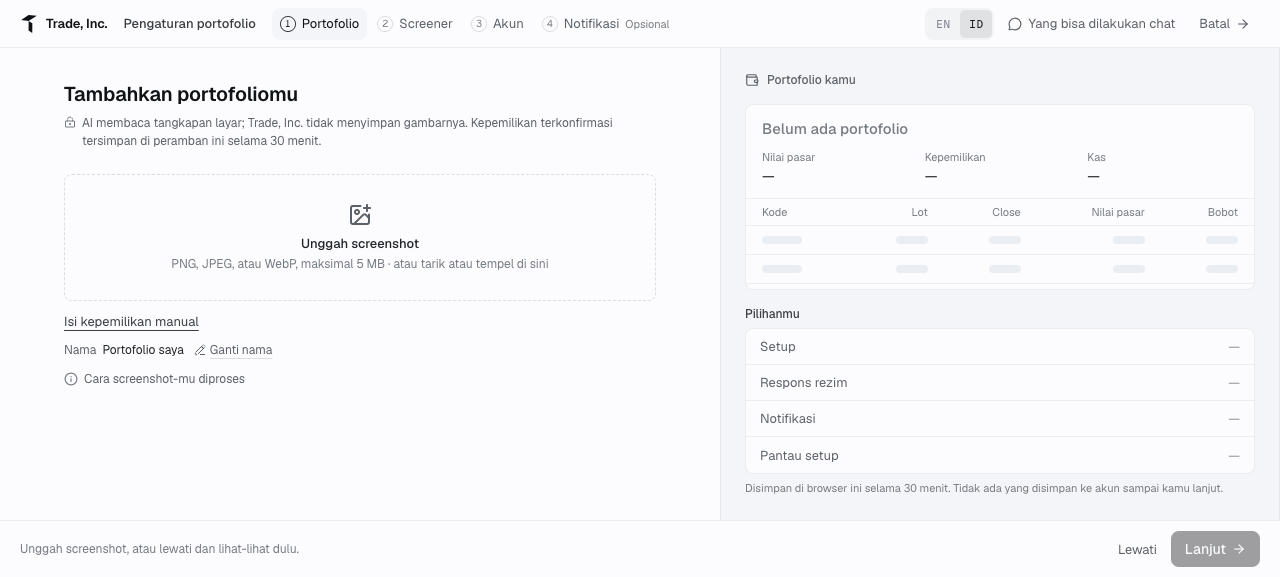
Step 1 — the real upload screen before any holdings were supplied. A manual-entry alternative is also visible.
Before uploading your own image, remove account numbers and unrelated personal information. Keep the ticker, quantity, quantity unit and relevant column headings legible. Do not crop away the distinction between lots and shares.
A controlled input makes the result checkable
We supplied the following original test image. It is not a broker screenshot, a real portfolio or a suggested allocation. Using known inputs lets us test extraction without exposing customer holdings.
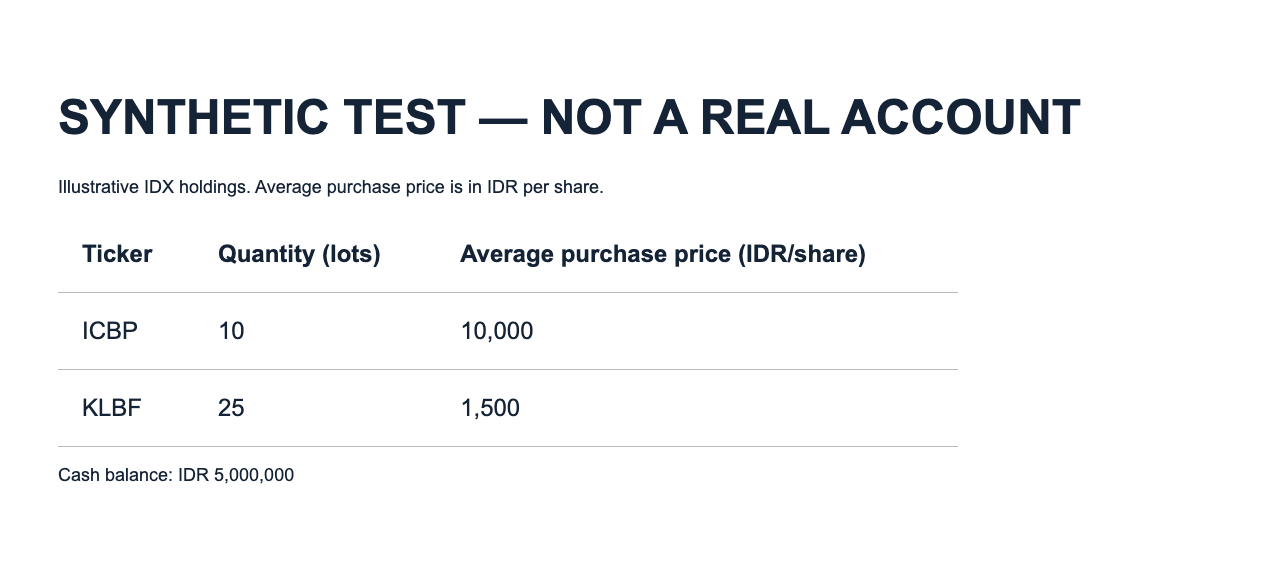
Step 2 — the exact synthetic input uploaded to the product. The average prices are invented test inputs, not current market quotes.
| Field | Input | Extracted value |
|---|---|---|
| ICBP quantity, lots | 10 | 10 |
| ICBP average purchase price, Rp/share | 10,000 | 10,000 |
| KLBF quantity, lots | 25 | 25 |
| KLBF average purchase price, Rp/share | 1,500 | 1,500 |
| Cash, Rp | 5,000,000 | 5,000,000 |
Both ticker symbols also matched. We did not correct any of these extracted fields.
Review each field before accepting the holdings
The initial review form provided editable ticker, lot and optional average-price fields. Its acceptance button remained disabled until we checked the statement confirming that each ticker and lot quantity had been compared with the image.
We checked the values, accepted them into the browser preview, then reopened Ubah to inspect the editable holdings and cash. The screenshot below is that reopened editor, not the initial upload form.
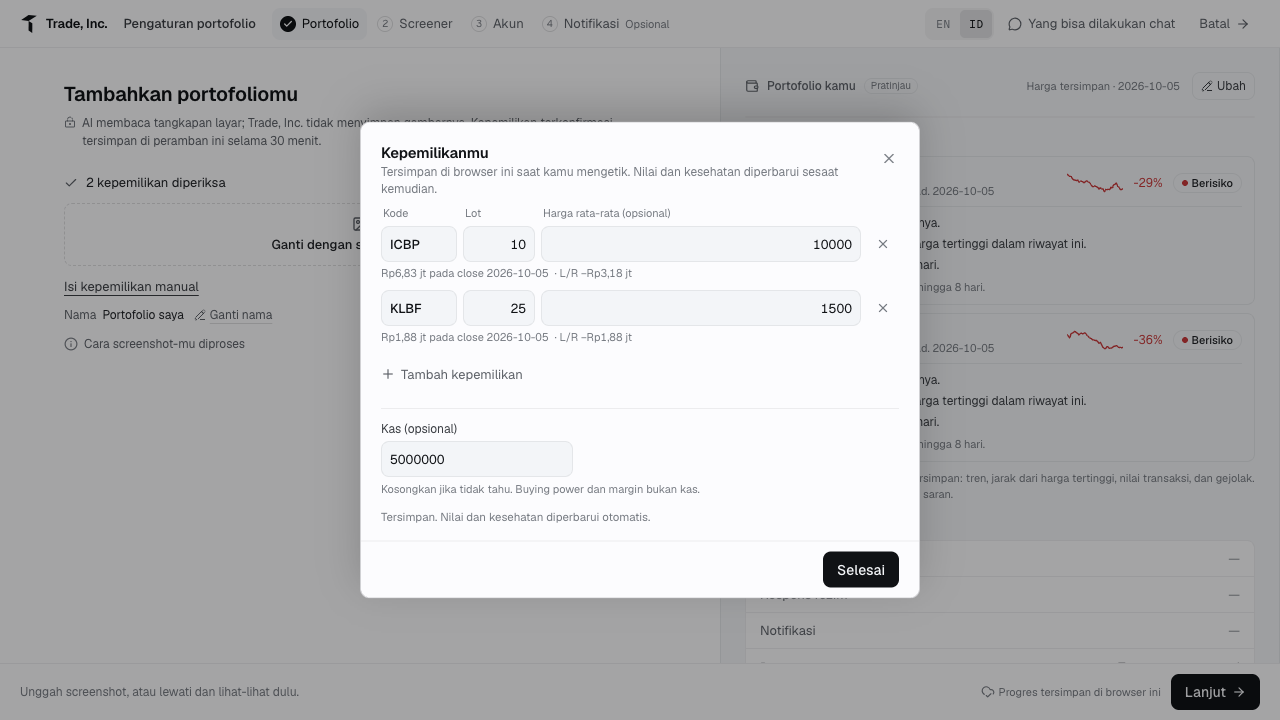
Step 3 — the real product result after accepting the synthetic holdings into the preview. Background market values are the application's displayed estimates, not figures taken from the uploaded image or independently verified exchange closing prices.
The review step matters even when extraction succeeds. Check whether a number denotes shares or lots, whether the price is an average purchase price or the latest quote, and whether a balance is cash rather than buying power or margin capacity. A readable label is more useful than a confident guess.
Purchase cost and market value are different checks
Using the preview's IDX convention of 100 shares per lot, the test inputs imply:
- ICBP: 10 × 100 × Rp10,000 = Rp10,000,000.
- KLBF: 25 × 100 × Rp1,500 = Rp3,750,000.
- Combined input purchase cost: Rp13,750,000, excluding any separately charged fees.
The preview displayed Rp13.75 million as purchase cost, matching this arithmetic. Cash remains separate from that cost.
Do not expect current market value to equal purchase cost. The application marks holdings using stored prices, while the uploaded average price represents your input cost basis. The screenshot's price labels and structural risk observations are not investment conclusions verified by this extraction test. A holdings snapshot also cannot reconstruct transaction history, dividend receipts or realized gains by itself.
Who this workflow fits—and who may not need it
It is useful when an investor wants to move a small holdings snapshot into a research workspace without retyping every row. Someone with only one or two positions may find the visible manual-entry option simpler.
Investors needing a tax ledger, automated broker reconciliation or a complete performance history should not treat this demonstration as evidence that those requirements are met. It verifies the input-and-review workflow, not those broader capabilities.
Limits and conclusion: verify before continuing
This was one clean, English-language, two-row synthetic image tested in an Indonesian-language interface. We did not test screenshots from named brokers, multiple pages, poor resolution, unusual separators, US holdings or fractional shares.
The interface stated that confirmed holdings remained in the browser for 30 minutes until continuing. We stopped before the next setup stage and did not create a Screener, configure notifications or save an account portfolio. The product's image-retention statement was not independently audited.
The practical decision rule is simple: use extraction to reduce typing, then reconcile every field. Broader confidence would require more varied input tests; even one unexplained quantity or cash mismatch would weaken it.
Related guides
- Tracking IDX and US holdings in one rupiah portfolio
- Previewing how a purchase changes cash and portfolio weight
This article is for research and information only. It is not personalized financial advice or an instruction to trade.