How Do Running Trades Filters Combine Price and Negotiated Blocks?
A PWON walkthrough shows why a Rp10 billion block condition can still display smaller events—and how it combines with a stock-price range.
By Trade Inc Research

Trade Inc’s Running Trades can combine a stock-price range with a requirement that a stock has at least one recorded negotiated-market trade above a chosen value. The important distinction is what gets filtered: a qualifying stock can still show smaller events. A Rp10 billion block condition does not mean every row must exceed Rp10 billion.
Trade Inc publishes this guide about its own product. We tested the Indonesian-language interface in an authenticated Pro session on 19 October 2026, around 16:07–16:08 WIB. The examples below are recorded screen observations, not independently reconciled exchange records or a promise of access on every plan.
Key takeaways
- Advanced conditions apply together: the interface says all must be met.
- The negotiated-block condition requires at least one qualifying transaction in the selected window, not a minimum for every displayed event.
- Missing values are excluded when their filter is set, according to the interface. Exclusion is not proof of a low value.
- A smaller filtered list is a research shortlist, not a trading signal or an ownership-change finding.
Set the stock conditions before interpreting the rows
Open Running Trades. For this demonstration we selected Hari ini (Today), kept Peristiwa individual (Individual events) active, left Watchlist off and retained all five event categories. The event-value-to-average-daily-value control remained at ≥ 1%. Results therefore still depended on those event settings as well as the advanced stock conditions.
Open Filter lanjutan (Advanced filters). Set Harga (Rp) to a minimum of 200 and a maximum of 500. Leave the other range fields blank. These numbers are arbitrary demonstration inputs, not a valuation rule or a recommendation to favour low-priced shares.
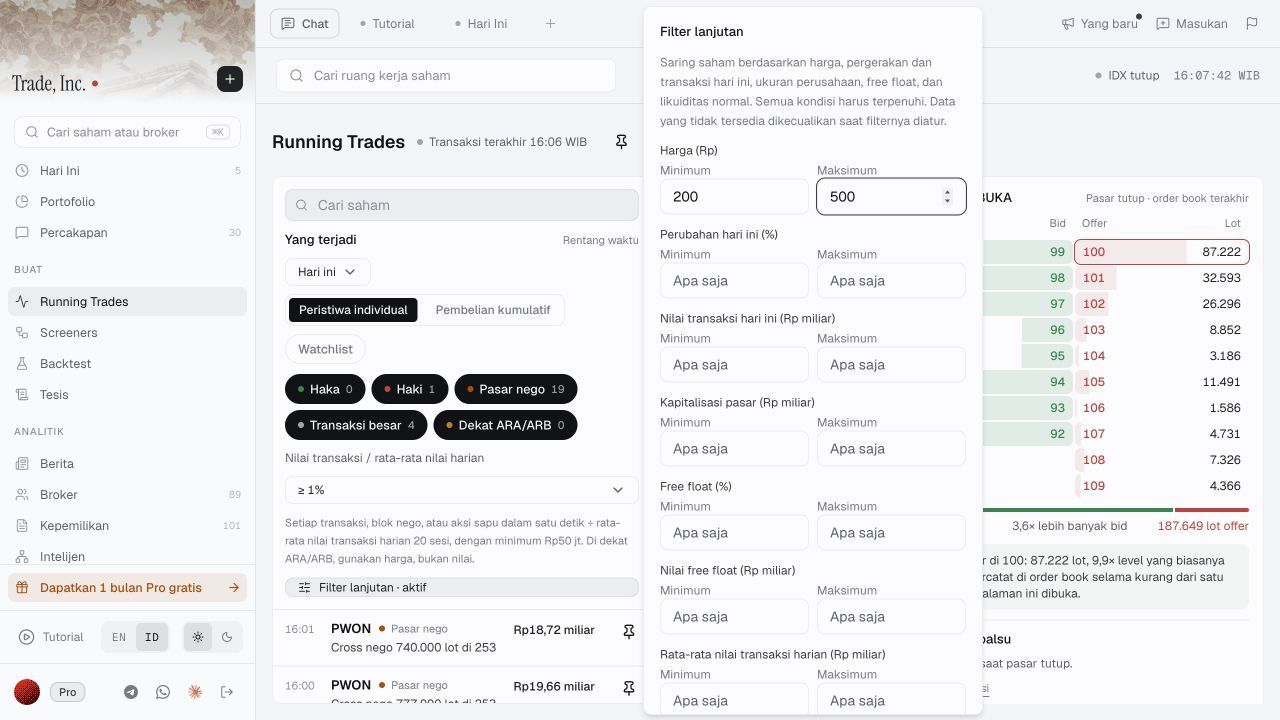
The upper part of the panel states the combined-condition rule and missing-data treatment. This is the actual product, not an illustrated interface.
Further down the panel, set Blok pasar nego ≥ (Rp miliar) to 10. The unit is billions of rupiah. The helper text says this requires at least one recorded negotiated-market transaction of that size within the selected time window, and does not identify a change in ownership.
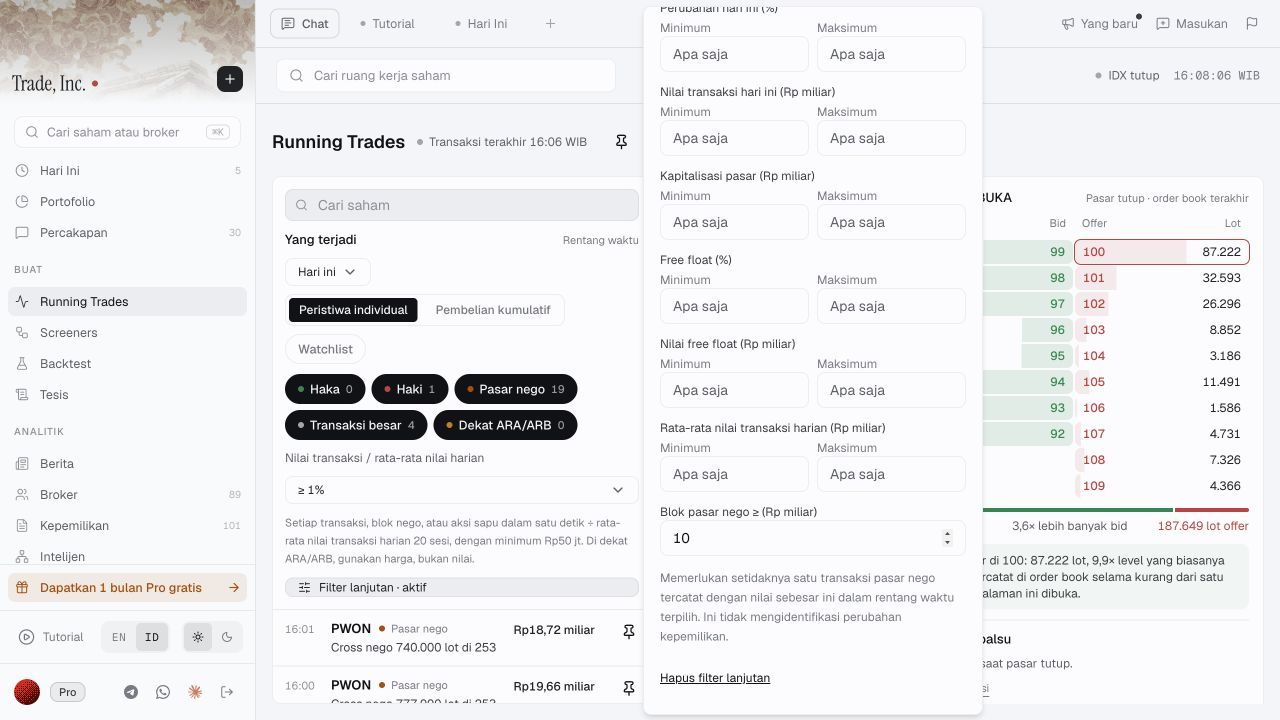
A stock-level existence test: at least one qualifying block within the selected window. It is not an instruction to add all smaller trades until they reach the threshold.
Why PWON still showed smaller events
Before adding the price range, the all-day view with the Rp10 billion block condition included BUKA, PWON and WIFI among its displayed stocks. After adding the Rp200–Rp500 range, BUKA and WIFI were absent from the event list while PWON remained. This is a bounded before-and-after observation, not a complete census of eligible IDX stocks.
Opening PWON showed a stock price of Rp254 and these events among its results:
| Displayed event time, WIB | Displayed event | Displayed value |
|---|---|---|
| 16:01 | Negotiated block, 740,000 lots at 253 | Rp18.72 billion |
| 16:00 | Negotiated block, 777,000 lots at 253 | Rp19.66 billion |
| 14:32 | Haki, two bid levels, 254 → 252 | Rp159.26 million |
| 14:19 | Large transaction, 5,127 lots at 254 | Rp130.23 million |
The two negotiated blocks each exceeded Rp10 billion. PWON’s displayed Rp254 stock price was also within the selected range. The smaller Haki and large-transaction events could therefore remain visible for that qualifying stock; their presence did not contradict the stated block condition. “Haki” is the interface’s event label here, not evidence of an investor’s identity or motive.
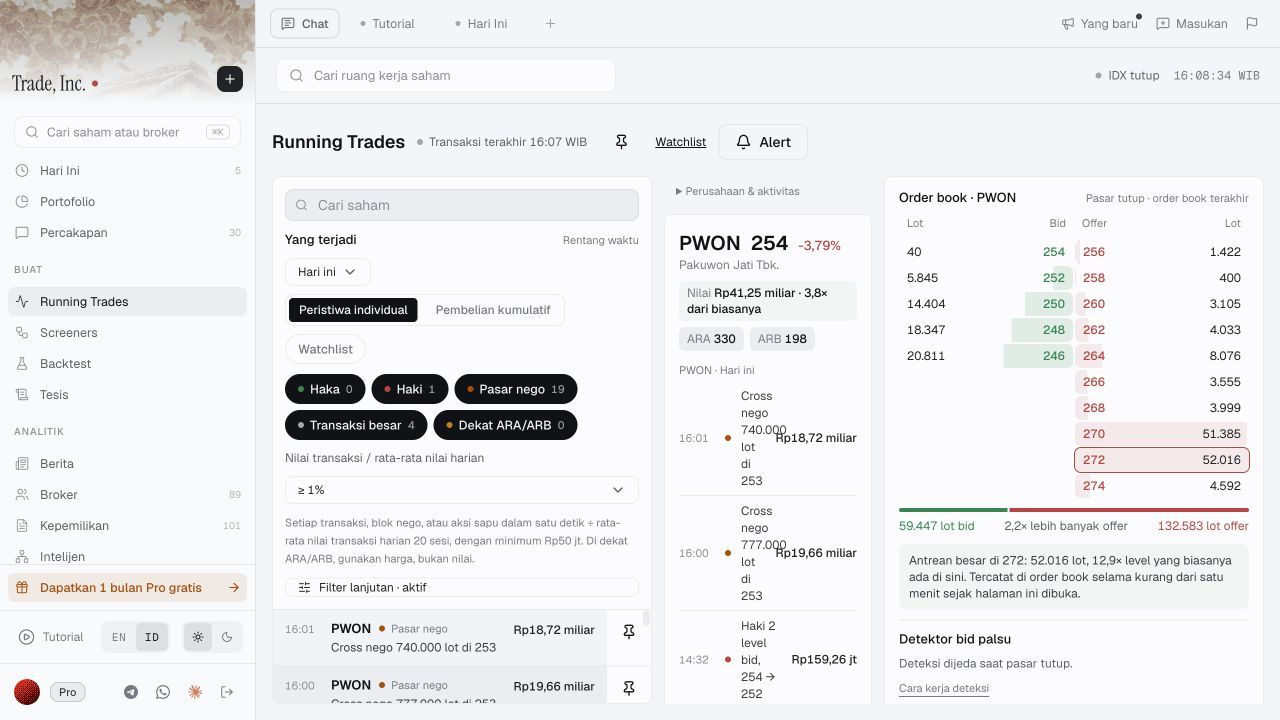
PWON’s detail panel includes both qualifying blocks and a smaller event. The adjacent order book is marked as the last book while the market is closed; this is not an execution demonstration.
Know what an empty result cannot tell you
The advanced-filter panel says unavailable data is excluded when the relevant filter is set. We read that rule but did not isolate a known missing-data stock to test it independently. Nor did we test every range boundary or every field combination.
If a stock disappears, check the active conditions and whether their inputs are available. Do not automatically conclude it had no transactions, had low liquidity, or failed only the newest condition. Immediately after changing controls, this test briefly displayed zero counters before results loaded; that intermediate state was not a verified empty result.
The Running Trades tutorial also asks readers to inspect values, observation times and coverage, and distinguishes event matches from an execution or return backtest. This walkthrough does not establish feed completeness, latency or future returns. The block filter itself supplies no evidence identifying the beneficial owners or the purpose of a negotiated trade.
Who benefits from combined filters?
This workflow fits a researcher who wants to narrow intraday attention using several observable conditions, then inspect the qualifying stocks’ events. It may be unnecessary if a small watchlist already serves that purpose; our watchlist walkthrough covers that separate route. If your existing terminal provides the same filtering and inspection workflow, another tool may add little for this task.
For execution questions, use the separate event-to-order-book walkthrough. Neither a negotiated block nor a stock passing several filters establishes what quantity can be bought now.
The acceptance test is simple: explain why the stock qualifies, then distinguish that explanation from the meaning of each row. We cleared the temporary advanced filters and restored the original time window after the test. No Screener, backtest, alert or trading order was created.
This article is for research and information only. It is not personalized financial advice or an instruction to trade.